The way people find information online has changed. Millions of users now ask ChatGPT to research products, summarize topics, and recommend services. When ChatGPT answers a query, it frequently cites its sources and includes clickable links.
If your website provides authoritative answers, ChatGPT will recommend you and send high-intent visitors your way.
But there is a massive tracking problem: traditional web analytics platforms are failing to catch this traffic. A huge portion of your AI-driven visitors ends up incorrectly categorized, blending invisibly into your “Direct” or “Unknown” traffic buckets.
If you want to accurately measure your AI discovery and optimization ROI, you need an exact way to isolate this traffic. Here is how to find out if ChatGPT is sending you traffic before it disappears into the dark unknown.
Traditional web analytics rely heavily on browser-side JavaScript tracking and standard referrer headers passed from page to page. However, traffic coming from ChatGPT is notoriously difficult to capture for three reasons:
Without a dedicated taxonomy to intercept these requests, you are entirely blind to your conversational search traffic.
To accurately map ChatGPT traffic, you have to move away from unreliable client-side scripts and capture the visit at the server level. This is exactly how Referrer Attribution operates.
Whether you use the CQI Referrer Attribution plugin for WordPress or the standalone Refer App for non-WordPress platforms, the system identifies the source channel of every single visit before the data vanishes into the “Direct” bucket.
Here is how the platform detects and exposes your hidden ChatGPT traffic:
Instead of requiring you to write complex regular expressions or filter strings manually, Referrer Attribution features a built-in AI Referrer Taxonomy. This system automatically maps 16+ conversational AI platforms—including ChatGPT, Gemini, Claude, and Perplexity—by their known infrastructure and referrer domains. The moment a click lands, it is cleanly categorized under a dedicated AI Referrer channel.
Because the classification runs server-side on your own hosting account, it doesn’t rely on heavy JavaScript tracking libraries that can be blocked or delayed by browsers or ad-blockers. The attribution log happens instantly as the page loads.
Unlike third-party trackers that send your visitor data to external cloud networks, your traffic data remains entirely yours.
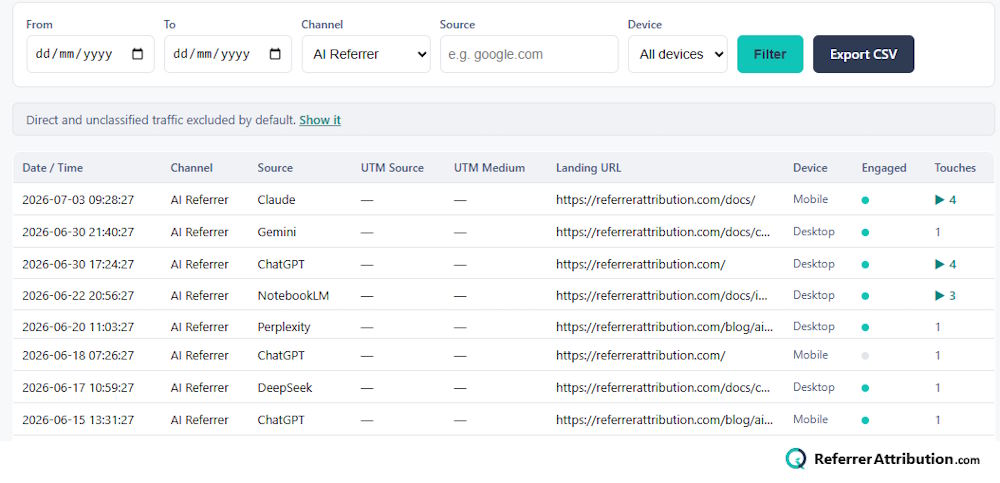
Once you have the tool running alongside your site (which requires no complex integrations), finding your ChatGPT traffic takes only a few clicks:
Tracking AI traffic doesn’t mean you need to slow down your site with massive tracking platforms or intrusive scripts. By using a first-party functional cookie rather than a tracking cookie, Referrer Attribution lets you log ChatGPT visits securely and with privacy compliance right on your own server.
Stop letting ChatGPT traffic hide inside your “Direct” traffic stats. Deploy server-side referrer attribution and see exactly where your conversational search growth is coming from.
Read more: How to Find Out If ChatGPT Is Sending You Traffic
Maintained by HDUK Limited. 167–169 Great Portland Street, 5th Floor, London, W1W 5PF.