Email is the most vital of communication tools for both businesses and individuals alike. However, many people face the frustrating issue of email delivery failures, where emails bounce back or land in spam folders instead of reaching the intended recipient. In fact it’s our least liked support category at TVA.
Understanding and addressing the causes of these failures can significantly enhance your email deliverability.
In this article, we will explore ten effective ways to reduce email delivery failures, introducing key concepts like DMARC, SPF, and DKIM. We’ll try to keep it simple and practical, so even non-technical readers can follow along.
What is SPF?
Sender Policy Framework (SPF) is an email authentication method designed to prevent spammers from sending messages on behalf of your domain. It allows domain owners to specify which mail servers are permitted to send email on behalf of their domain.
Example:
Imagine you own the domain mybusiness.com. By setting up an SPF record, you tell email servers that only specific IP addresses (like your mail server’s IP) are authorized to send emails from mybusiness.com.
How to Set Up SPF:
Pros:
Cons:
References:
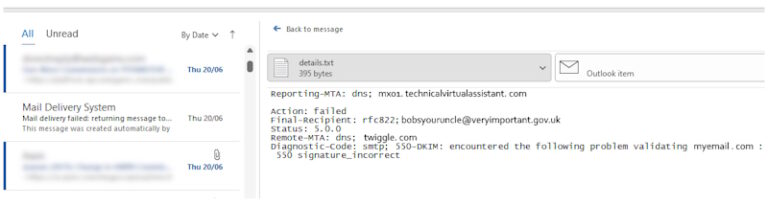
What is DKIM?
DomainKeys Identified Mail (DKIM) adds a digital signature to your emails, allowing the receiving mail server to verify that the email was indeed sent by the domain owner and has not been altered in transit.
Example:
When you send an email from [email protected], DKIM adds a signature to the header. The recipient’s server uses this signature to check if the email was truly sent by mybusiness.com.
How to Set Up DKIM:
Pros:
Cons:
References:
What is DMARC?
Domain-based Message Authentication, Reporting, and Conformance (DMARC) builds on SPF and DKIM by allowing domain owners to specify how emails that fail authentication should be handled.
Example:
DMARC lets you instruct email providers to quarantine or reject emails that fail SPF or DKIM checks for mybusiness.com.
How to Set Up DMARC:
Pros:
Cons:
References:
What is a Clean Email List?
A clean email list contains only valid and active email addresses. Regularly removing inactive or incorrect addresses helps reduce bounce rates and improves deliverability.
Example:
If you have 10,000 email subscribers but 2,000 addresses frequently bounce back, cleaning your list will remove these invalid addresses, reducing the risk of being marked as spam.
How to Clean Your Email List:
Pros:
Cons:
References:
What is Spammy Content?
Spammy content includes certain words, phrases, or formatting that can trigger spam filters. Examples include excessive use of exclamation marks, all caps, or phrases like “Buy now” and “Free offer”.
Example:
An email with the subject “ACT NOW!!! Get FREE!!! Access to Our Product” is likely to be flagged as spam.
How to Avoid Spammy Content:
Pros:
Cons:
References:
What is Sending Reputation?
Your sending reputation is a score that ISPs (Internet Service Providers) assign to your domain based on your email-sending practices. A poor reputation can lead to emails being blocked or marked as spam.
Example:
If you frequently send emails to invalid addresses or have high spam complaint rates, your domain’s reputation may suffer, causing more emails to be filtered out.
How to Monitor Sending Reputation:
Pros:
Cons:
References:
What is Email Segmentation?
Segmentation involves dividing your email list into smaller groups based on specific criteria like demographics, interests, or purchase history. This allows for more targeted and relevant email campaigns.
Example:
Instead of sending the same email to all 10,000 subscribers, you can segment your list into groups like “New Customers” and “Loyal Customers” to tailor your messaging.
How to Segment Your Email List:
Pros:
Cons:
References:
What is an ESP?
An Email Service Provider (ESP) is a platform that helps you send marketing emails, transactional emails, and other types of messages. Reliable ESPs offer features like high deliverability rates, analytics, and automation.
Example:
Using a reputable ESP like Mailchimp, Sendinblue, or Constant Contact can ensure your emails are delivered on time and with minimal risk of being marked as spam.
How to Choose an ESP:
Pros:
Cons:
References:
What is Bounce Handling?
Bounce handling involves managing emails that cannot be delivered. Bounces are categorized as “hard” (permanent issues) or “soft” (temporary issues).
Example:
If you send an email to [email protected] and it bounces back because the mailbox is full (soft bounce), you might try sending it again later. For a hard bounce (e.g., invalid address), you should remove it from your list.
How to Configure Bounce Handling:
Pros:
Cons:
References:
What is a Feedback Loop?
A Feedback Loop (FBL) is a system where ISPs notify you about spam complaints made by recipients. This helps you identify and address issues that lead to complaints.
Example:
If users mark your emails as spam, an FBL can alert you, allowing you to remove these users from your list and adjust your content strategy.
How to Set Up Feedback Loops:
Pros:
Cons:
References:
Reducing email delivery failures involves a combination of technical setups and best practices. By implementing SPF, DKIM, and DMARC, cleaning your email list, avoiding spammy content, monitoring your sending reputation, segmenting your list, using a reliable ESP, configuring bounce handling, and enabling feedback loops, you can significantly improve your email deliverability.
Summary of Pros and Cons:
By following these practices, you can ensure that your emails reach your audience effectively and maintain a healthy email communication strategy.

Managed by HDUK Limited. 167–169 Great Portland Street, 5th Floor, London, W1W 5PF.